Tuesday, January 31, 2006

Slow and steady wins the race

I don't know if I've ever made a New Year's resolution in my life. They've always rung hollow for me--if I need to improve myself, I don't need to wait for the change of year to start doing it. In that sense, they seem more like a way to postpone self-improvement more than initiate self-improvement (i.e., the fellow who says to himself in mid-November "I really need to take off a few pounds; that'll be my New Year's resolution," then proceeds to gorge himself through two months of holidays before dieting for the first few weeks of the New Year).

Well, this year that changed. I finally found a resolution worth doing. Not for the first time in my life, I'm going to copy my older brother.

Last year, my brother Dave had a great resolution: on January 1 he did a pushup and a situp. On the 2nd, he did two pushups and two situps. And so on. By April, he was doing 100 of each per day. By July, 200 per day. And, of course, on December 31st, he did 365 pushups and 365 situps. And during the course of the year, his physique changed drastically. In September, when he turned 40, his wife gave a toast at his birthday dinner and said that he looked better then than he had in their entire relationship.

So I decided to do it this year. It's a fun resolution because it starts so easy (it felt almost silly when I got down on the floor and did one pushup; but I did it, and I was on my way). Even now, 31 days in, it's a very brief "workout," but it's starting to feel like an honest set of pushups (and crunches).

The sheer numbers involved get staggering. Over the course of the year, I'll do 66,795 pushups (you can figure this out in Excel, or you can use the fun method: 1 + 2 + ... + n = (n + 1) * (n / 2)). I know I'll be breaking them into sets eventually, but for now it's fun to see how long I'll be able to do them in one set.

What's making this even more fun is that a bunch of my friends are joining me: John, Robert, and Nathan from Digipede are doing it, and my old friend Marc. It's great having other people doing it, because we can harangue each other to make sure no one is sliding.

I'll do my 500th pushup and situp of the year tomorrow morning; I'll hit 1,000 on Valentine's Day and 10,000 on May 21st. On my birthday in August I'll do my 26,000th situp. And in the month of December alone I'll do over 10,000. I hope I (and all of my friends) can stick with it. I think the inspiration for me is to see what I can accomplish by dedication, tenacity, and an incremental increase in effort. And the next trick will be to apply those principles to other parts of my life (certainly working at a startup for the last two years feels similar!).


Duke Listens! : Weblog

Over at Paul Lamere's blog last week, he had a post about The simplest possible grid computing platform:

In his Ongoing blog Tim Bray mentions that he'll be giving a talk at this year's JavaOne called: Sigrid: The simplest possible grid computing platform. If I make it to JavaOne this year, I'll put this talk at the top of my list. There's a big gap right now in Grid Computing. There are Grid Computing APIs, but these seem to be designed for the traditional big iron apps like those used by chemical companies and Wall Street. It is hard to write grid apps with these APIs. In order to get more programmers and companies to think about moving their apps to the grid, it has to be easier to write grid apps. In particular this means:
  • Use a friendly programming language like Java
  • Be able to develop and test on a desktop system
  • Have a minimal API
  • That's a great idea, Tim. Of course, not everyone programs in Java, so that solution isn't for everyone.

    I love the qualifications, though, because they apply perfectly to the Digipede Network. Friendly language? See my post from yesterday to see a comparison of C# and Java (of course, you can use the Digipede Network in any language that has a .NET or COM interface). Test on a desktop system? I run the whole thing on my laptop routinely. Minimal API? If you haven't seen my webinar where I grid enable an existing app in 20 lines of code, drop me a line and I'll invite you to the next one and show you the coolest API known to grid computing!

    As soon as we get permission, we'll publish case studies about companies that have ported their systems to our APIs in less than a day!

    Technorati tags: , , ,

    Monday, January 30, 2006

    (Nearly) VSLiveBlogging

    It looks like Robert is LiveBlogging from VSLive (well, almost live).

    I don't know how good his connectivity will be, but if you're interested in what's happening at VS Live SF, follow him at Expert Texture.

    Technorati Tags:

    AgentMine.com on C# and Java

    Over on AgentMine.com there is a great post comparing C# to Java Paul Graham’s Essay “Java’s Cover”:

    In 2001, Paul Graham wrote an essay about Java in which he summed up his opinion of Java thusly:

    Java seems like a stinker to me.
    Graham then goes on to give a 12 point list of why he thinks Java stinks. I won't go into it point-by-point, because AgentMine does.

    AgentMine then does something very interesting: he takes the same 12 points, and applies them to C#. He looks at them to decide if, well, C# seems like a stinker. As it turns out, C# has a much better score than Java.

    His final analysis:

    The results:
    Microsoft’s C# language should only have 25% of the total level of suck that Java has.

    It's tongue-in-cheek, but it's very informative. Take a peek.

    Technorati tags: , ,

    Monday, January 23, 2006

    And the winner is...

    I love awards ceremonies as much as the next guy.

    Well, to tell you the truth, I don't love awards ceremonies. I habitually avoid the Oscars/Emmies/Grammies/Tonies/YouNameIties broadcasts unless someone really cool is throwing a party. In fact, I think I've been avoiding awards ceremonies ever since my band, Lawsuit, was nominated for a SAMMIE Award (Sacramento Area Music Award) and invited to play at the ceremony, then suffered the indignity of performing immediately before finding out that we didn't win. Apparently the booker liked us more than the voters.

    Anyway, here's an award ceremony I am excited for:
    CODiE Award 2006 Finalist
    The Digipede Network has been named a finalist for a 2006 CODiE Award in the Distributed Computing Solution category!

    For those of you not in the know, the CODiEs are awards presented by the Software & Information Industry Association (SIIA). This is their 21st year; they are the longest running, most prestigious independent award in the industry. Getting recognition from their panel of experts is fantastic.

    The competition is fierce and widely varied: Everdream, Gigaspaces, Novell, and Solace Systems are all finalists as well.

    Every SIIA member company gets a vote; the CODiE Awards Gala will be on May 16th (my mom's birthday!) at the St. Francis Hotel in San Francisco.

    I hope that the wonderful, intelligent, good-looking SIIA voters (hey, a little brown nosing never hurt!) like what we're doing!

    Sunday, January 22, 2006

    More .NET SaaS

    For a while now, I've been preaching the importance of both .NET and grid computing in the area of SaaS; they're both enabling technologies.

    I'm always happy to find validation.

    Over on the dotnetSaaS blog, Glen Cameron has a long quote from Romesh Wadhwani of Symphony Technology Group.

    Romesh writes a lot about the software industry (some of which is right on, some of which I don't entirely agree with). One part I do like is this:

    Enterprises want unified platforms and we're increasingly seeing a move towards the use of grid computing. But the grid is still nascent. There is a lot of infrastructure, underlying operating systems, middleware and visualization tools that are missing or not robust enough today.

    There is a significant opportunity to develop the enabling tools and technology that accelerate the delivery of applications and solutions on grid computing platforms.


    Absolutely correct. I'd argue that the essential middleware components are increasingly available. Adoption is starting to happen now.

    And, on a side note: I hope that Sam Ramji knows that there's a blog out there called dotnetSaaS. Sam promotes SaaS for Microsoft's Emerging Business Team, and he'll be glad to see it being promoted!

    Technorati tags: , ,

    Monday, January 16, 2006

    Windows grid: cheaper than you think

    As I mentioned in my post yesterday (Grids: All HPC? All *nix? Not anymore), I promised to follow up on one of the arguments used against using a Microsoft OS on a compute grid: cost.

    In Kim's eBig talk, one of the audience members mentioned why he thought that Microsoft was behind in grid computing, and he gave a concrete example. He talked about the cost involved in setting up a 256 node compute cluster. If you're paying $400 retail for each copy of Windows Server 2003, that adds $100,000 onto the price of your cluster (even $300 copies of XP Pro would run about $75K). As the audience member observed, that's nothing to sneeze at.

    When you compare it to $0 for 256 copies of your favorite Linux flavor, the Microsoft solution does seem expensive.

    However, on further reflection, it becomes clear that there are costs beyond OS, and that OS cost alone is not a fair comparison.

    First of all, the example assumes a purpose-built cluster. This goes against one of the primary reasons for grid computing: taking advantage of the computers that already exist. If you want 256 Linux boxes in a typical organization, you need to go buy them. But if you need the power of 256 Windows machines--you probably already own them! Because Windows is the dominant operating system, your organization probably has thousands of Windows machines that can contribute to your grid.

    Even if you need to buy some new hardware, you can have an "extended" cluster featuring a combination of dedicated hardware (in your cluster) and shared hardware (underutilized servers and/or idle desktops). By using existing hardware, you save not only OS costs but hardware costs as well.

    Furthermore, the example only counts the operating system cost--not the cost of any other aspects of the system. Some of the most popular *nix based distributed computing solutions cost one to two thousand dollars per node! Sure, you saved $300 by getting a free OS--then you spent more than triple that on your grid solution. That dwarfs the cost of the OS.

    And, it doesn't count what is often the largest cost of all--the cost of setting up the grid. Many of the *nix solutions are what we like to call "thinly disguised consulting projects." They are so complicated that setting them up involves hundreds (or sometimes thousands) of hours of consulting time. Some of the big consulting companies have excellent grid computing practices--but I assure you, they're not cheap. Put a small team of consultants on your payroll at $200 an hour for a couple of months and watch how quickly they, too, outpace your OS costs.

    So, are the Microsoft OSs too expensive for compute grids? Probably not. Most likely, you can get an extended cluster using some existing hardware (and OS), some new hardware, add the Digipede Network (at under $200 a node), and set it up without an expensive consulting project.

    One more X-factor here: as far as I know, Microsoft has not yet announced pricing for its Compute Cluster Solution, which will be out later this year. Who knows? When that price is announced, it may make the OS decision even more economical...

    Sunday, January 15, 2006

    Grids: All HPC? All *nix? Not anymore.

    Kim's eBig talk on Thursday night went very well. It was her first public speaking engagement as a Digipede evangelist, and I thought she did great.

    Her audience was diverse and obviously very well versed in the concepts (and practices) of distributed computing.

    One of the great things that Kim was able to do was to let the audience understand that distributed computing does not apply only to HPC or technical computing anymore. Even the attendees who had experience using grid systems or HPC systems before understood that, while distributed computing was once the hallmark of HPC, its applications today go far beyond technical computing.

    One question that came up was why so much distributed computing occurs in the *nix OSs, and not on the Windows platform. A little discussion ensued, and the ideas that came forth were pretty accurate.

    First, it was pointed out that much of the research into distributed computing has come from academia. Academics, of course, have always preferred UNIX and the Linux alternatives to Windows (I know that when I graduated from Berkeley in Computer Sciece in 1991, I had never used Windows at school).

    Second, the commercial push to grid (as always, I'll alternate between the terms "grid" and "distributed" without going into the distinctions between the two) has come from firms with strong *nix leanings: IBM and Sun. Both have UNIX histories; more recently, of course, IBM has been pushing Linux.

    The third reason that the group came up with was the price of the OS. If you are buying 256 boxes for a dedicated cluster, the OS cost becomes a large part of the cost.

    There's no doubting the first two reasons. They're indicative of the history of grid computing, but things are changing. The third, though, is a bit of a red herring. Tomorrow I'll get into the reasons why.

    Thursday, January 12, 2006

    Something to do on a Thursday...

    If you're in the Bay Area, you should mosey on over to Pleasanton to see Digipede's #1 Evangelista Kim Greenlee as she gives an eBig presentation entitled "Grid Computing for Windows."

    Kim's going to give a introduction to and history of grid computing, but then she's going to drill down on Windows. How do the concepts of grid computing trnanslate to a Windows environment? How can you take advantage of Windows machines?

    If you're interested, register here.

    Wednesday, January 04, 2006

    Four Stars for Digipede Network

    As I mentioned previously, Software Development Magazine published a review of the Digipede Network in the January edition. The verdict? Four stars!

    Now they've got the article available online. Read the full article here.

    On Demand in 2006

    eWeek has been doing a series called "Innovations 2006 Analysis," in which it takes in-depth looks at technologies that will have great impacts in 2006. One of the technologies they highlighted was On-Demand Software, or Software as a Service.

    The attention paid to SaaS sometimes confuses me a bit--SaaS has certainly been possible for 10 years now (my previous company, Energy Interactive, had a successful product called Energy Profiler Online, which has been sold as a service for nearly a decade).

    So why the attention now?

    The underlying technologies are now available that make SaaS better able to compete with traditional software offerings. The biggest difference between 1996 and 2006? High bandwidth internet availability. It seems archaic to think about now, but when we began selling EPO to electric utilities, one of our big concerns was the time it would take their users (who were often connected to the net via modem) to download the graphics we used for buttons!

    Another change: the quality and security in OSs/web servers/databases/etc. No matter what platform you're talking about, great strides have been made in the security and quality of service available from the underlying tools. Microsoft's initial forays into these areas (early versions of IIS, NT, and SQL Server) did not provide the quality necessary for vendors to guarantee quality of service; the open-source community had some decent tools but were nascent at the time. In the ensuing decade, both camps have made significant improvements--Microsoft's tools have improved dramatically, and the open-source community has continued to improve Apache, MySQL, Linux, etc.

    But I'll add one more innovation that has made SaaS a viable alternative to traditional software delivery: distributed computing. Key technologies have emerged in the last couple of years that make it easier to scale software across many machines; as noted in my previous post here, scalability is one of the keys to providing software online.

    Back in 1997 when we were writing EPO, scalability was one of our biggest concerns--there was no easy way to take the compute intensive operations inherent in the software and distribute them across many servers. We had to write that code ourselves. It was laborious work, and it wasn't really part of our core competency at the time.

    Nowadays, products like the Digipede Network make distributed execution easy. Instead of spending months hardcoding solutions to allow their software to scale, SaaS developers can write a few lines of code that add inherent scalability to their product. That, in turn, enables people starting SaaS companies to spend their programmer dollars adding features to their software. They end up with a product that not only has a better feature set (because they spent more time and money on it), but is also more scalable and robust (because they aren't using a jury-rigged solution for distribution).

    2006 may be the year of SaaS--but if that's true, than it's the year for distributed computing as well.

    Wednesday, December 21, 2005

    Maximizing computation, minimizing data

    I had a Digipede customer ask me last week about how to optimize his processes for running on the Digipede Network. He is grid-enabling an existing application--he's got a class that does a lot of calculation, and he wants to have a bunch of those objects calculating in parallel. Each object is already independent.

    Sounds perfect for distributed execution, right? "Twenty lines of code" away from being Digipede-enabled?

    Well, not quite.

    See, the objects that he does his calculation on are pretty darn big--on the order of 20-25 megs each. He actually had no idea they were so big; but the class has lots of members, and many of the members are large classes themselves. Now, the Digipede Network can certainly move objects of that size--but those objects have to be moved in order to calculate on them, and moving data is often more time consuming than the computation you need to do on it. (See Jim Gray's Distributed Computing Economics to get an idea of what that means, but bear in mind that we are only discussing LAN-wide computation here).

    The answer can frequently be to create a class that contains only the data relevant to the distributed calculation. In the case with this customer, he was "retrofitting" the application to work on the Digipede Network. His class wasn't designed for distribution and, as a result, had a lot of data in it that wasn't necessary for the calculation that he wanted to happen remotely. In other words, his objects did a lot in their lifetime, only a portion of which was going to be distributed.

    The customer needed to create a class that contained only the data that was relevant to his distributed process, and use that as a member in his huge class. Only this new, smaller class gets distributed across the network. Instead of moving 20MB per object, he was now moving only a few kilobytes. When the small class returns from its journey across the network, its result data is then copied back into the main object.

    Our customer needed to do a bit more work than the fabled "twenty lines of code"--but he ended up with a more structured application and vastly improved performance.


    Thursday, December 15, 2005

    Good Reads

    [Update: looking for my discussion of Microsoft's tools? It's down here]

    Here are a few links for your perusal...

    Don Dodge
    , always an interesting read, echoes Dan'l Lewin's list of hot startups using Microsoft tools here:

    Digipede—Its "many legs make light work" and turn any combination of servers and desktops into a grid for .NET apps.
    Over at the Science Library Pad, they point out that SearchCIO has published Gartner's 2006 Top 10 Strategic Technologies.
    Grid computing. Who's doing grid computing? Charles Schwab, Royal Dutch Shell and Sony are among the companies tapping the technology. Definitions of grid computing vary, but its popularity continues to rise.

    And, my favorite read of the day, Software Development Magazine has just published a review of our software, the Digipede Network. Paid registration required for the article, but suffice it to say: Four stars! Thanks guys!

    It's a great review, and not just because he liked our product. As it turns out, the author (Rick Wayne) isn't just a tech writer--he also does soil analysis. He knows his way around compute intensive simulations. So he converted his office into a mini-grid, using nothing but the Digipede Network software (and included documentation, of course)--with not a drop of help from us. He got it working in a snap, and he was one happy camper.

    Technorati tags: , ,

    MS Tools Too Expensive? Think Again.

    This started as a thread in some comments over on Scoble's blog, but it got to be too long for a comment so I moved it over here.

    An anonymous commentor wrote:

    There are startups using .NET, but they aren’t the majority, and those who chose to do so are buying themselves into a trap with expensive licenses and a locked-in platform.

    Jeremy Wright from b5Media, who has a great blog called Ensight, contradicts him:
    The startup can grab ISV packs which’ll cost about 2500$ to get the company up and running with all the dev tools and server bits they’ll need. Toss in another 2500$ and they’ll get all the MSDN stuff they need. 5000$ is not that much to get a 5-10 man shop up and running, even when bootstrapping.

    Jeremy has a great point, but he's off by an order of magnitude!

    I work at a startup. We joined Microsoft's Empower program, which exists to help startups with initial costs. It cost us $375. It included a universal MSDN subscription with 5 user licenses, as well as 5 licenses for Office, and "the full array of server products including Windows Server 2003, Exchange 2003 Server and SQL Server."

    Um, does $375 seem like an exorbitant amount for that?

    Also included: technical support and training. Individuals at Microsoft assigned to help us with technical details, our marketing, and even our sales.

    As soon as we could, we became Partners, then Certified Partners, then Gold Certified Partners. The benefits are enormous: Microsoft helps with marketing, they help with architectural issues, we get early releases of software, we get direct access to the product teams and their roadmaps. Oh, and we get GREAT license benefits.

    If you haven't worked with Microsoft, then you just don't understand this: they work very, very hard to create an ecosystem that actually fosters innovation. They want startups like mine to choose their tools, so they do a tremendous amount of work to make it a good choice. And with programs like Empower, the cost of all those tools, operating systems, and support, is virtually nothing.

    Windows may not be your OS of choice, and if your users are all running Linux boxes, obviously these tools and programs aren't for you.

    But if you think it's too expensive for a startup to use Microsoft products, you just haven't done the research.

    From our perspective: it's a slam dunk.

    Technorati tags: , ,

    Tuesday, December 13, 2005

    Not done Christmas shopping yet?

    Dan'l Lewin, who runs Microsoft's Emerging Business Team, has picked out his list of "coolest companies under the tree."

    Guess who made the cut?

    Thanks, Dan'l. I predict there will be no coal in your stocking this year!

    Thursday, December 08, 2005

    Of Course Scaling Matters!

    The controversy over at Jeremy Wright’s Blog, which started with this post, hasn't slowed down much. He's gotten a ton of comments, flames, and posts. He defends himself here:

    Which is why designing for scale is so important. I don’t believe any startup “needs” to achieve anything more than around 2 9s of uptime, which is what a properly configured server should do for you. However, even at the beginning, you need to be coding and planning for growth.
    Small things like managing how transactions occur, having separate database connections for reading and writing, making your app able to handle variable state sessions, etc are key.
    (emphasis mine)

    One of his posters, Ian Holsman, responds:
    The reasoning behind not worrying about scaling is that in a lot of cases people worry about the wrong things. They will spend hours getting that code tuned just so, and have it running in 10ms less time, only not to realize that the code is only run once a day.

    Scott Sanders from Feedlounge also responded:
    The FeedLounge development process was more along the lines of:
    1. Build a webapp, see if the features are compelling to a set of users, keeping a design in mind that is capable of scaling
    2. Overrun the shared server that you are using, switch to dedicated server, so you can properly measure the effects of the application.
    3. Add more users, adding requested features from the users, measuring the load in a fixed, known environment, and start work on “Distributed” part of ladder. The is where the build portion of the scalability starts.
    4. Now that you believe you have something that has value, invest in the hardware and software development necessary to scale. Continue working on priority based tasks towards release of your product.
    (again, emphasis mine)

    Scott's point is valid, and the italicized portion makes it valid: you need to be designing your software so it's capable of scaling. No, Ian, this doesn't mean spending weeks optimizing the code to trim every last microsecond off of every transaction. It means designing your software well from the beginning.

    Most importantly, it means acknowledging the possibility, however remote, that you may actually succeed and build something that people eventually use. Many people.

    This point applies equally to those designing web sites and those planning on deploying SaaS. If you are going to make it available on the web, and you're not designing for scalability, then you just aren't planning for success: you're planning for failure.

    Ian does make one point validly: in the beginning, you can't spend too much time on scalability. You need to make sure you get the <content, features, service, whatever> right. But you need to be prepared for scaling; that's why it's important to choose a toolset in the beginning that makes scaling later as easy as possible.

    Plan on succeeding.

    As a product manager, I'd be remiss if I didn't point out that that is exactly what we designed our SDK for--so developers can spend their time in their area of expertise, but have a framework underpinning their software that will scale when the time comes.

    Technorati tags: , , , ,

    Wednesday, December 07, 2005

    How to Buy a Grid

    I was starting to prepare a post on how to buy a grid--what are the steps you can take, and what's involved.

    Then I remembered this post by my colleague Kim. It's a great place to start: 10 easy steps, and guaranteed success (well, they may not all be easy, and no one can guarantee success). But it's a very good list of things to consider when you are educating yourself about a purchase.

    I'd add one more thing to watch out for: don't be swayed by features that you don't need (and won't be able to take advantage of). If someone tells you that their software is the most powerful on the planet because it works on 12 different operating systems and can tie together PCs in Idaho with mainframes in Kirkutsk, but you have 200 PCs in one office building, how does that help you? It doesn't. So look for something that will help you the way you work.

    So read Kim's post. It's a good one. Plus, she used it to invent the word gridified, which is my new favorite word.

    Tuesday, December 06, 2005

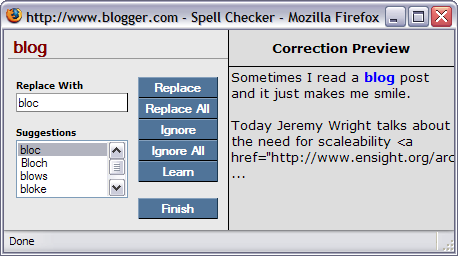
    Hey, Blogger! Spell check much?

    I tend not to use spell-checkers; I try to read my writing carefully (although anyone who has been paying attention knows that I certainly don't always do that successfully).

    Today, for the first time, I used Blogger's built-in spell checker.

    It choked on a word, that, well, I thought it would know...


    Technorati tags:

    Web 2.0 Companies NEED To Scale

    Sometimes I read a blog post and it just makes me smile.

    Today Jeremy Wright talks about the need for scaleability for Web 2.0 companies (he's specifically talking about an announcement from FeedLounge). He says:

    Listen up. If your company relies on the web to stay alive, you’d damn well better be using at least some of the following “ladder to high availability”:

    Backups, Redundant, Failover, Cluster, Distributed, Grid and finally Mesh

    Each step up is a massive increase in cost, but it’s also a massive increase in uptime and such. I hate it when companies say they want 99.9% uptime (or even worse 5 9s of uptime) without thinking about what that’ll cost them.

    Distributed/Grid computing should be the kind of thing that these companies are thinking about from the time they begin planning their architecture. They have to plan for success. They have to plan on hundreds of thousands or millions of users, right?

    And I'll go a step further than Jeremy--the other thing Web2.0 companies shouldn't do is write that portion of their applications from scratch. I mean, no one in their right mind writes their own database to sit under web apps, right? You go get one--SQL Server, MySQL, PostgreSQL , whatever is right for you--but it would be a complete waste of your time to sit down and write one from scratch.

    So why do people try to do that with a distributed/grid system? Most do. It's too bad; it's a waste of their valuable time and money. And in all likelihood, they'll end up with a solution that isn't nearly as scalable as they think is.

    I'll let Jeremy finish this one up for me:

    If your business depends on your website being up, look at your code, look at your infrastructure and for your users sake figure out what you actually need and build the damn thing properly!


    Technorati tags: , ,

    VS 2005: VSTO Improvements

    A couple of weeks ago, I wrote a post about my difficulties in upgrading a VSTO project from VSTO 2003 to VSTO 2005 (for those of you unfamiliar with VSTO, it stands for Visual Studio Tools for Office). It's replacing VBA as the method to put code behind spreadsheets, Word documents, etc.)

    I had some difficulties upgrading a VSTO project from Visual Studio 2003 to Visual Studio 2005; they've changed some of the architecture, and it was a pain (read that post if you want the gory details).

    However, my post was remiss--I neglected to mention any of the good changes in VSTO.

    First and foremost: Integrated development environment. In the past, if I wanted to put buttons on my Excel spreadsheet, I had to put Excel into "Design mode", create buttons using the Control Toolbox, then switch over to Visual Studio to wire those to methods in my C# code. It was pretty cumbersome, and dealing with modality in Excel was a pain ("No, I meant to select the button, not click it!"). Now, all of the design work is done directly in Visual Studio 2005--I open my Excel spreadsheet there, and I work on the UI using the regular toolbox in Visual Studio. It's a much more cohesive experience.

    Secondly: now the controls look better! The buttons that appear on the Excel spreadsheet just plain look better than they used to.

    Third: this is the part I don't quite understand. For some reason, the .NET code in the spreadsheet seems to load much faster. I can't tell if this is my imagination or not--but I've done this a bunch, and I don't think it is. It seemed in the past that when I made my first call into .NET code behind my spreadsheet, I had a several-second delay (disclaimer: I have the slowest laptop on the planet). For whatever reason, that seems to have disappeared. Now, when I make my first call, it happens immediately. This must be a .NET 2.0 change (because I'm still running the same version of Excel 2003), but it's certainly welcome.

    The change to the object model took some getting used to, and it was annoying to have to rewrite some of my code. But I'm coming around to it.

    Last, the methodology of associating the binary with the spreadsheet has been improved. In the past, there were two custom file properties in the spreadsheet--one which gave the assembly location, and one which gave the assembly name. The location defaulted to NameOfSpreadsheet_bin, and the name of the DLL was NameOfSpreadsheet.dll. It always looked pretty unwieldy--you'd have your NameOfSpreadsheet.xls, and next to it a NameOfSpreadsheet_bin folder with a NameOfSpreadsheet.dll in it. And if you ever moved anything, it was a pain to tell .NET 1.1 how to give permission to the new DLL.

    Now, the custom property of the spreadsheet has the GUID of the DLL in it, and .NET 2.0 gives permission to that GUID. This means that you no longer need to have a *_bin folder, and you have a much easier time if you need to move/deploy your spreadsheet.

    So the upgrade process is a pain. But once you get in there, VSTO for Visual Studio 2005 is definitely better to work with that VSTO for Visual Studio 2003. I haven't built anything extravagant yet (unless you consider a grid-enabled, supercomputing spreadsheet extravagant--come to my webinar in a half an hour to hear more about that), but I think the product is much improved.

    [Updated 13:17 adding Technorati tags]